




Article Summary: Don't wait for an audit to find out what's missing.
Good DQ file management software helps your team organize driver records, track expiration dates, identify missing documents, and prepare for DOT audits without digging through paper files and spreadsheets.
When comparing platforms, focus on five things: centralized digital records, automated document tracking, clear compliance reporting, audit access and workflows that reduce manual work.
The right system should make it easy to answer one important question: Are our drivers' files complete, current and ready for review?

6 Things to Look for in DQ File Management Software
Not all compliance systems handle driver qualification files the same way. Some store documents electronically. Others help track missing records, flag expirations, and show your team where action is needed.
Before you choose a platform, here's what to evaluate.
1. Centralized Digital Driver Qualification Files
The problem: A driver's documents might be scattered across shared folders, paper files, email attachments, and multiple software systems. When someone needs a specific record, finding it becomes a project in itself.
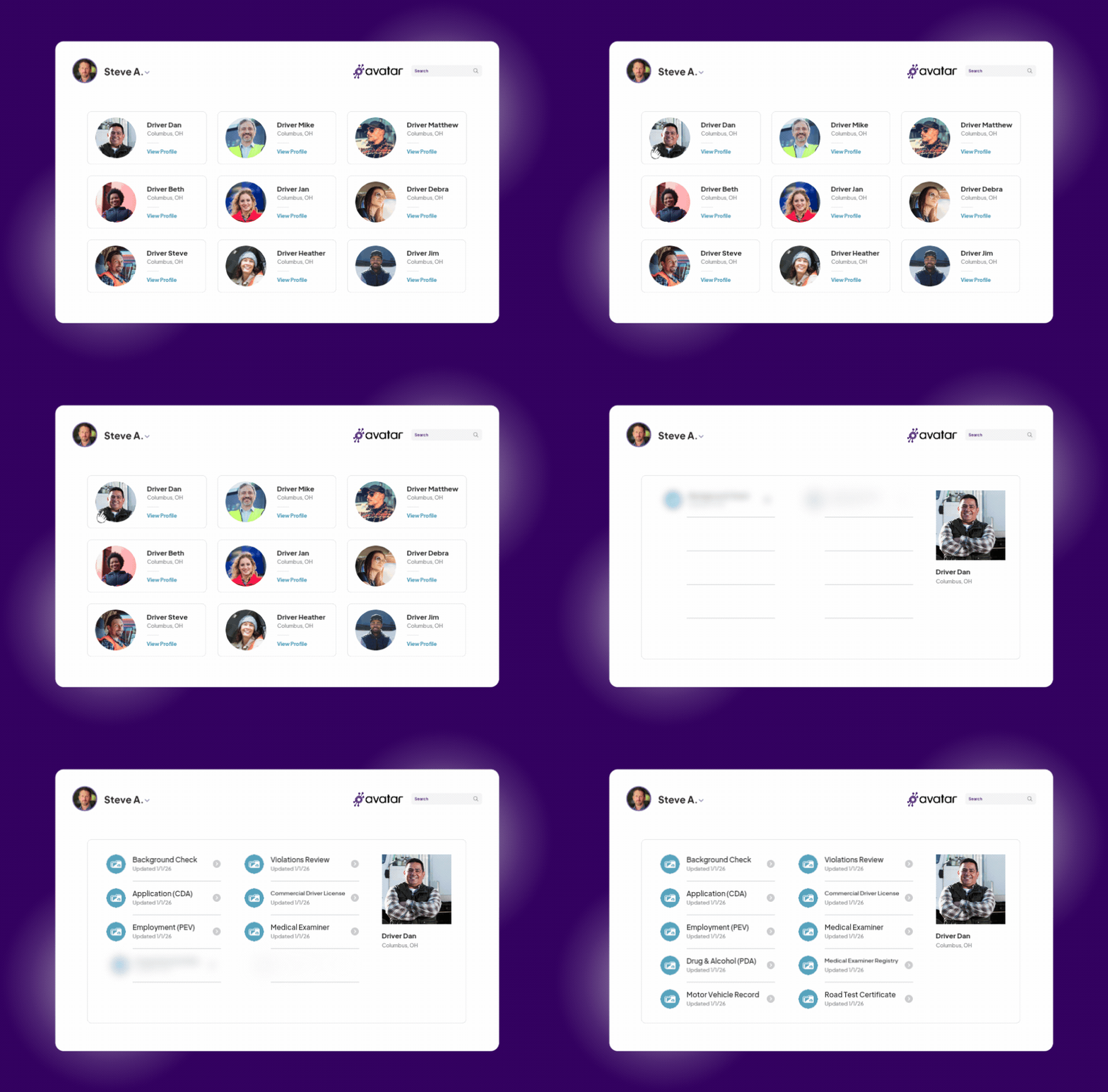
Your driver qualification file software should bring the required records together in one organized, searchable location for each driver.
Look for:
- Digital driver qualification files
- Clear organization by document type
- Easy access to individual driver records
- Appropriate permissions for sensitive information
- A way to identify missing or outdated documents
Ask the vendor: Can I open a driver's file and quickly see what's there, what's missing, and what needs attention?
Also ask how the platform handles documents that shouldn't be stored in the DQ file. Some employment, drug and alcohol records have separate storage and access requirements. Your software should support the distinctions that apply to your operation.
Why it matters: Your team shouldn't have to remember which folder, spreadsheet or system holds a particular record.

2. Automated MVR and Medical Card Tracking
The problem: Keeping track of motor vehicle records (MVRs), medical cards, and commercial driver's licenses takes ongoing attention. If your team relies on calendar reminders or spreadsheets, it's easy for a renewal or required review to slip through.
Look for software that supports:
- Tracking MVRs and required review dates
- Recording medical card and license expiration dates
- Automated reminders before documents expire
- Digital document collection from drivers
- Integration with monitoring or screening services where needed
Ask the vendor: What does the system track automatically, and what still requires someone to check a date, order a record, or manually update a file?
Pay attention to the difference between tracking an expiration date and actually obtaining or monitoring a record. For example, MVR monitoring may be an optional service or integration rather than a standard feature.
DriverHub supports digital DQ files, automated expiration reminders, and AI-assisted license and medical card scanning. Its DOT compliance software page outlines these capabilities.
Why it matters: Automated reminders give your team time to address upcoming expirations instead of discovering a problem after a document becomes outdated.
3. A Compliance Dashboard That Shows What Needs Attention
The problem: Storing every document electronically doesn't automatically make compliance easier to manage. Your team still needs to know which records are missing, which have expired, and which drivers need attention.
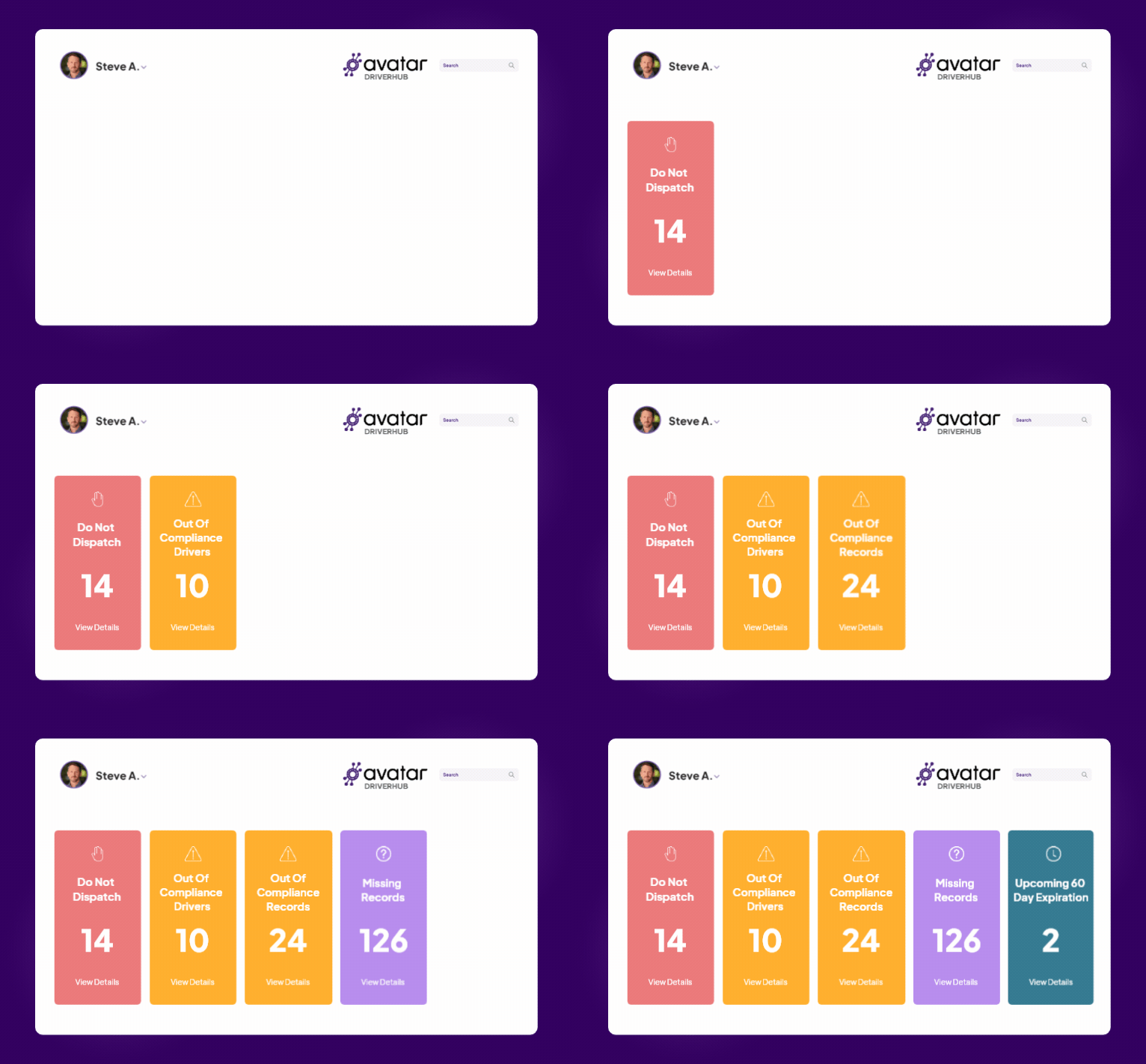
Look for a dashboard that clearly identifies:
- Drivers who are out of compliance
- Missing required records
- Expired documents
- Upcoming expirations
- Drivers who shouldn't be dispatched
Ask the vendor: Can I see fleet-wide compliance issues in one place, or do I have to open individual driver files to find them?
A useful dashboard should help your team move from identifying a problem to resolving it. It should also make the reason for a compliance flag clear, so your staff doesn't have to hunt through multiple screens to understand what's wrong.
DriverHub's Compliance Dashboard provides a real-time view of compliance status, including missing records, upcoming expirations and Do Not Dispatch status.
Why it matters: Problems are easier to address when they're visible. Your safety team can prioritize the records that need attention rather than manually checking every file.
4. Audit-Ready Records and Controlled Access
The problem: An audit can become much more stressful when records are disorganized, difficult to retrieve or mixed with documents that shouldn't be shared.
Your software should make it easy to locate requested records and provide appropriate access without exposing more information than necessary.
Look for:
- Organized, searchable digital files
- Clear document histories and dates
- Restricted access for sensitive records
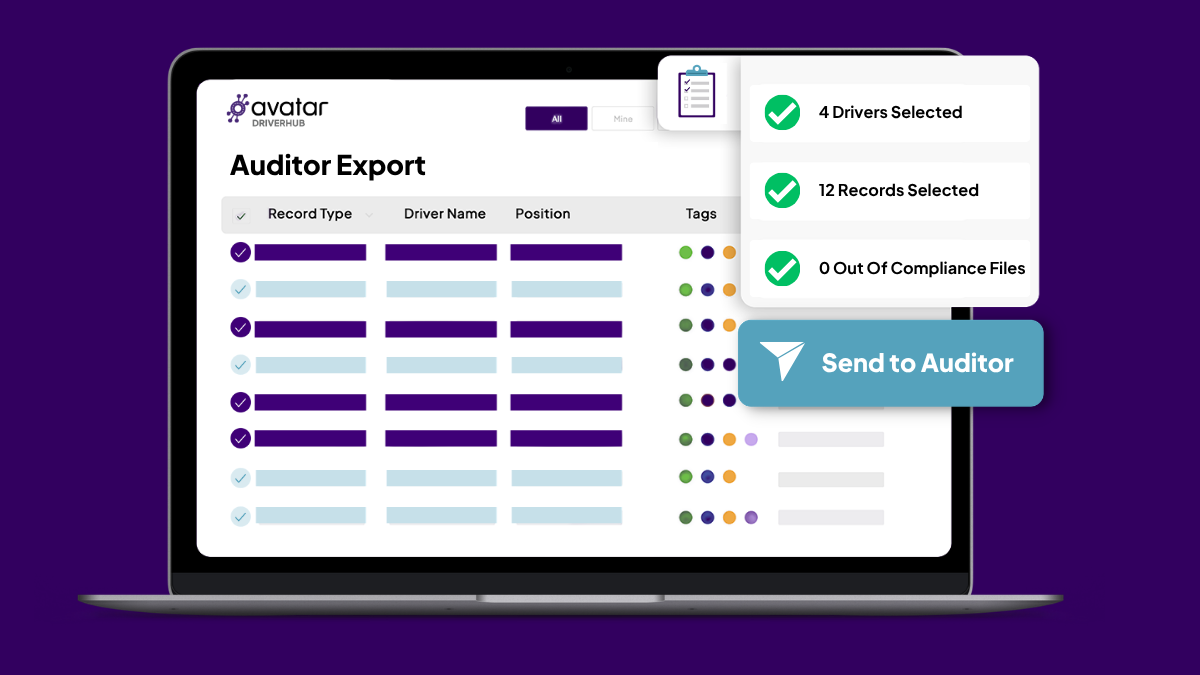
- A straightforward way to provide auditors with requested documents
- Consistent file organization across your operation
Ask the vendor: Can I give an auditor access to the specific records requested without opening up every driver file or sensitive document?
Don't assume that digitizing your records automatically makes them audit-ready. Your team still needs to maintain complete, accurate files and follow applicable retention, privacy, and regulatory requirements.
A real-world example: Vandalia Bus Lines finished its DOT audit two days early with DriverHub. The audit was scheduled for four days but wrapped up in about a day and a half. The Safety Director described how organized digital files made it easier for the auditor to review and cross-check records.
Why it matters: When records are organized and accessible, your team can spend less time searching for documents and more time addressing the auditor's actual questions.
5. A Smooth Handoff From Onboarding to Compliance
The problem: Driver records start accumulating during hiring. If information gathered during onboarding doesn't carry into the compliance workflow, someone has to move documents, re-enter information or check whether everything made it into the right place.
Look for software that connects centralized driver onboarding with ongoing DQ file management.
Check whether the platform can:
- Carry driver information into the appropriate records
- Collect required forms electronically
- Identify missing documents during onboarding
- Apply the right compliance requirements to different driver roles
- Make completed records available to the safety and compliance team
Ask the vendor: When a new driver finishes onboarding, what still has to happen manually before their qualification file is complete?
The goal is to reduce duplicate entry and make responsibilities clear. Recruiting can manage hiring steps, while safety and compliance teams maintain oversight of required driver records and ongoing compliance.
Why it matters: A smoother handoff helps prevent missing paperwork from becoming a problem later.

6. Alerts That Help You Act Before Documents Expire
The problem: A list of upcoming expirations is useful only if someone has time to work through it. Your software should help your team act on approaching deadlines instead of simply displaying them.
Look for:
- Configurable expiration alerts
- Automated text or email reminders where supported
- Clear lists of records that need renewal
- A way to identify overdue items
- Visibility into whether the required follow-up has been completed
Ask the vendor: Can the system notify drivers and the appropriate staff before a document expires? Can we see which records still need attention?
Make sure you understand how reminders work. Ask when they're sent, who receives them and whether the system tracks the record's status after the notification.
DriverHub supports automated alerts for drivers and managers about upcoming renewals, along with a compliance dashboard that flags missing or expired records.
Why it matters: Earlier reminders give drivers and staff more time to submit documents and resolve issues before deadlines arrive.
Your DQ File Software Buying Checklist
Before signing a contract, use this checklist during vendor demos.
- Digital driver qualification files in one organized location
- Tracking for required MVRs, licenses, and medical cards
- Automated expiration reminders
- Clear visibility into missing and expired records
- A compliance dashboard with actionable information
- Appropriate access controls for sensitive records
- Audit-friendly file retrieval and sharing
- A smooth handoff from onboarding to compliance
- Integrations that reduce manual work
- Clear answers about which features cost extra
One final test: ask the vendor to demonstrate a driver file with an expired medical card, a missing required document, and a record that's coming up for renewal.
Watch how the system identifies each issue and what your team must do next.
If the demonstration depends on someone checking a spreadsheet, remembering a date or manually searching through multiple files, ask why that step can't be handled more efficiently.
Choose Software That Makes Compliance Easier to Manage
The best DQ file management software isn't simply a digital filing cabinet. It should help your team keep records organized, identify gaps, track expiration dates, and respond to compliance issues before they become bigger problems.
Avatar DriverHub combines digital DQ files, expiration alerts, document scanning and compliance visibility to help transportation teams manage these responsibilities in one place.
If you're still relying on paper files or disconnected systems, start by reviewing Avatar's DQ file management resources, including its driver qualification file checklist.
Ready to see how your files could be easier to manage?
Schedule a DriverHub demo and ask the team to walk through the DQ file workflow your fleet manages every day.

Get the latest articles on all things transportation delivered straight to your inbox.
Schedule a live demo
Share:


Categories
