/Avatar-MainMark-FullColor-400px.png)


Features / Qualification Questions
Know If a Driver Qualifies Before Making the First Call
DriverHub's qualification questions collect CDL class, endorsements, years of experience, and violations directly on your job landing page. Open the queue and see exactly who meets your standards.
Built for recruiters and recruiting managers at for-hire carriers, bus and motorcoach companies, and private fleets who hire for CDL, non-CDL, and non-driving roles.
Stop Wasting Time on Candidates Who Don't Qualify

The Old Way
 |
|
|
| Recruiters discover deal-breaker details 30 minutes into a phone screen after calendaring, prepping, and calling | One static application for every role: CDL questions go to mechanics, non-CDL forms go to drivers | Qualification details buried in notes: no way to scan who qualifies across your full applicant pool at once |
The New Way: Qualification Questions
 |
|
|
| Disqualifying answers surface before your recruiter touches the file. No wasted calls, no wasted prep | Role-specific question sets: CDL questions for driving roles, different sets for non-driving positions | Qualification answers visible as columns in your Candidate Browser: see everyone's answers in seconds |
 Question Builder
 Role-Specific Questions
 Candidate Browser View
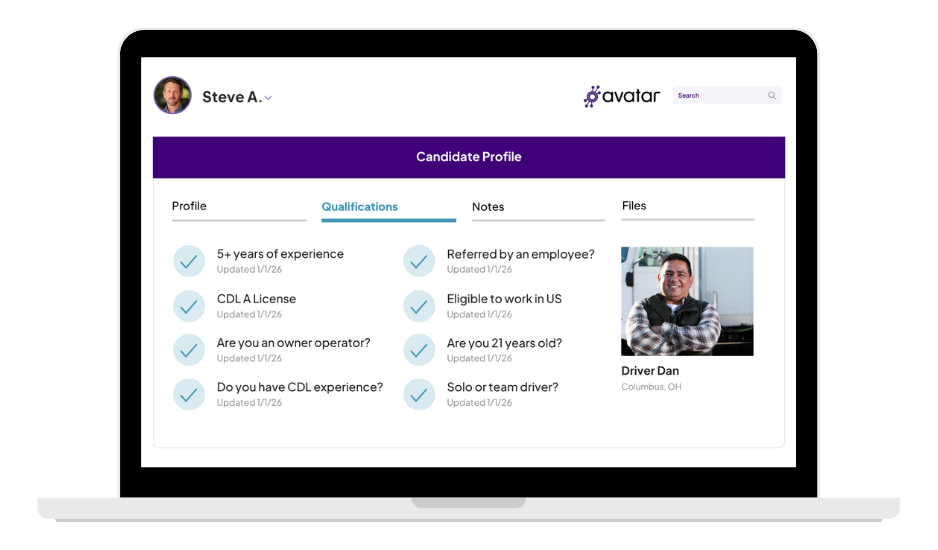
 Qualifications Tab
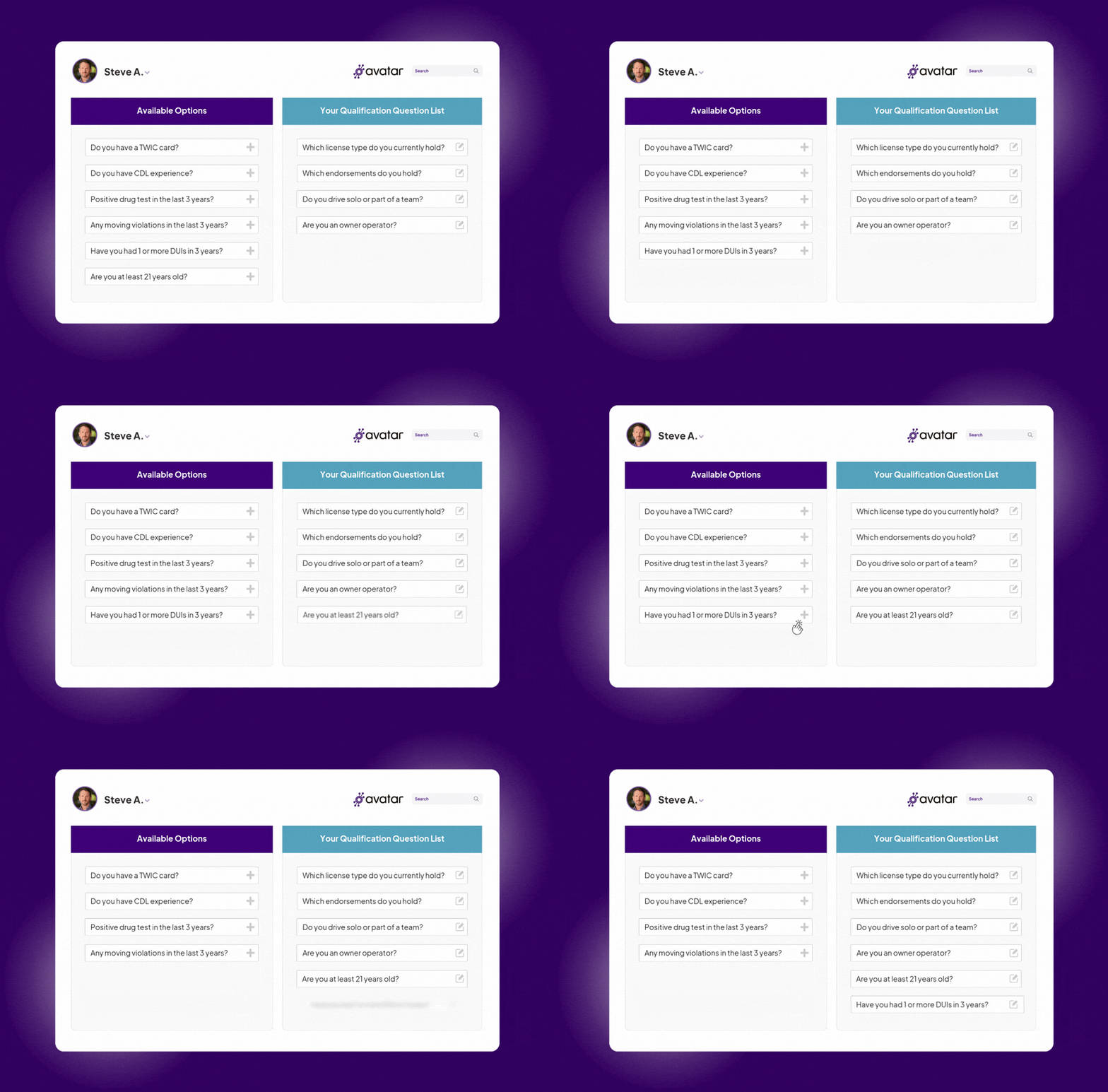
Question Builder
- Pre-built library of CDL-specific questions — CDL class, endorsements, years of experience, violations, and more
- Drag questions into your active list in any order — your full setup takes under 10 minutes
- Customize how each question is phrased to match your voice without changing its underlying data function
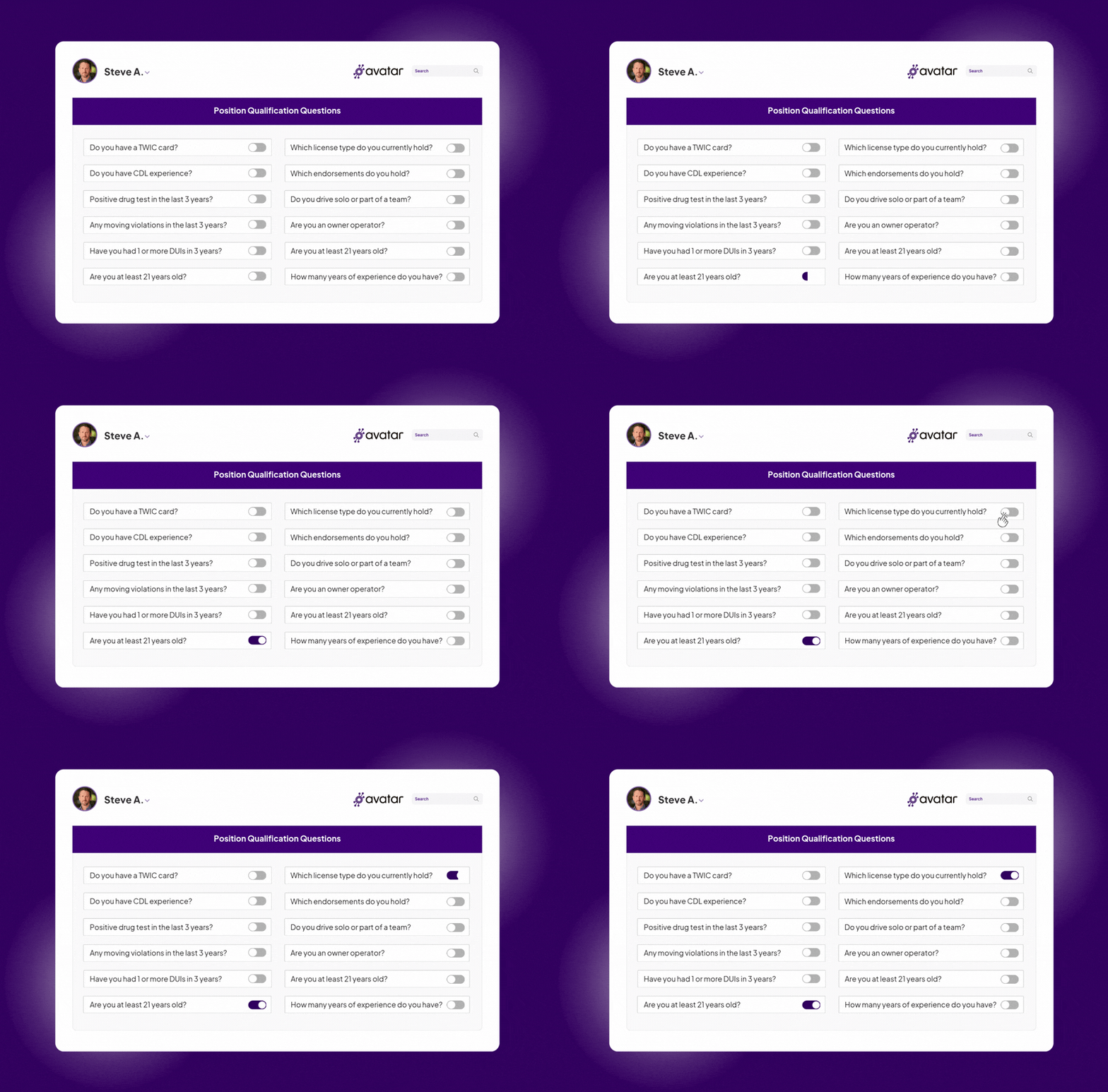
Role-Specific Questions
- Your master question list applies to all positions by default
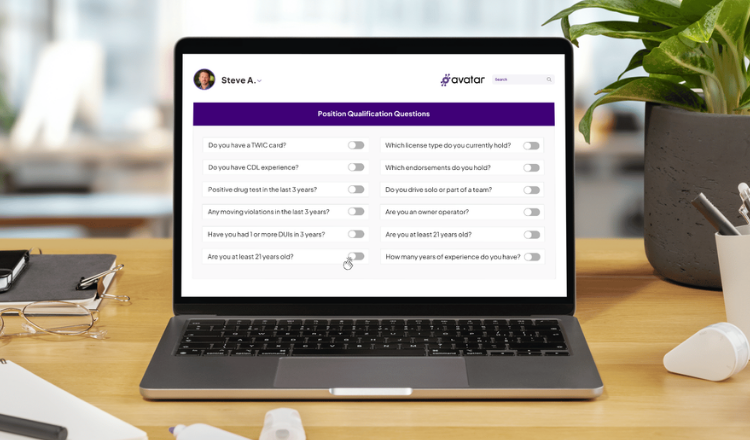
- For non-CDL roles, navigate to that position and toggle off CDL-specific questions in one click
- Drivers see driver questions. Mechanics see mechanic questions. Changes go live on your landing page immediately
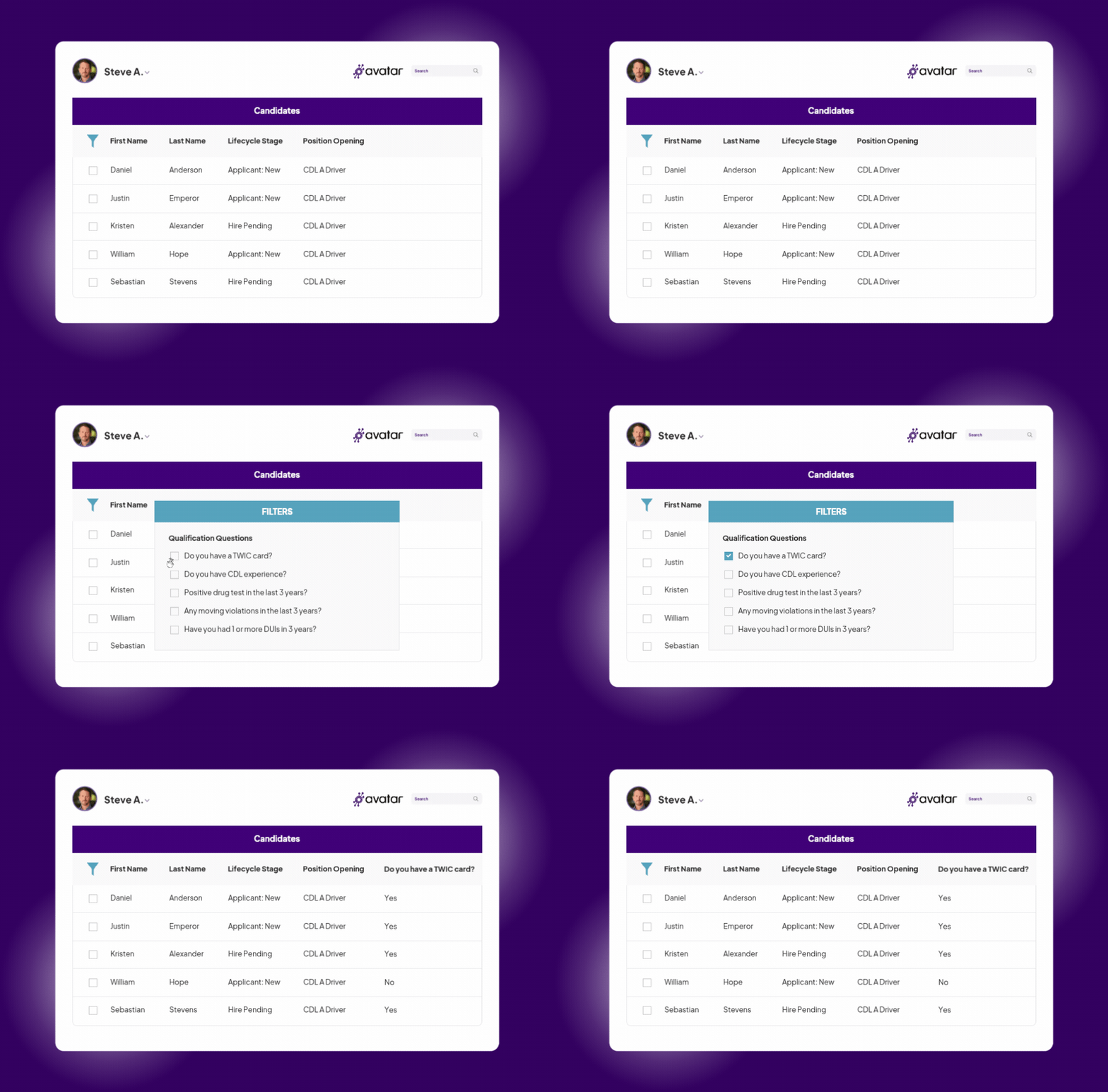
Candidate Browser View
- Right-click any column header in the Candidate Browser to add qualification answers as visible columns
- The suit icon marks each qualification field — identify and filter your best candidates in seconds
- Save it as a Saved View called "Active Qualifications" and return to it any time — no reconfiguring
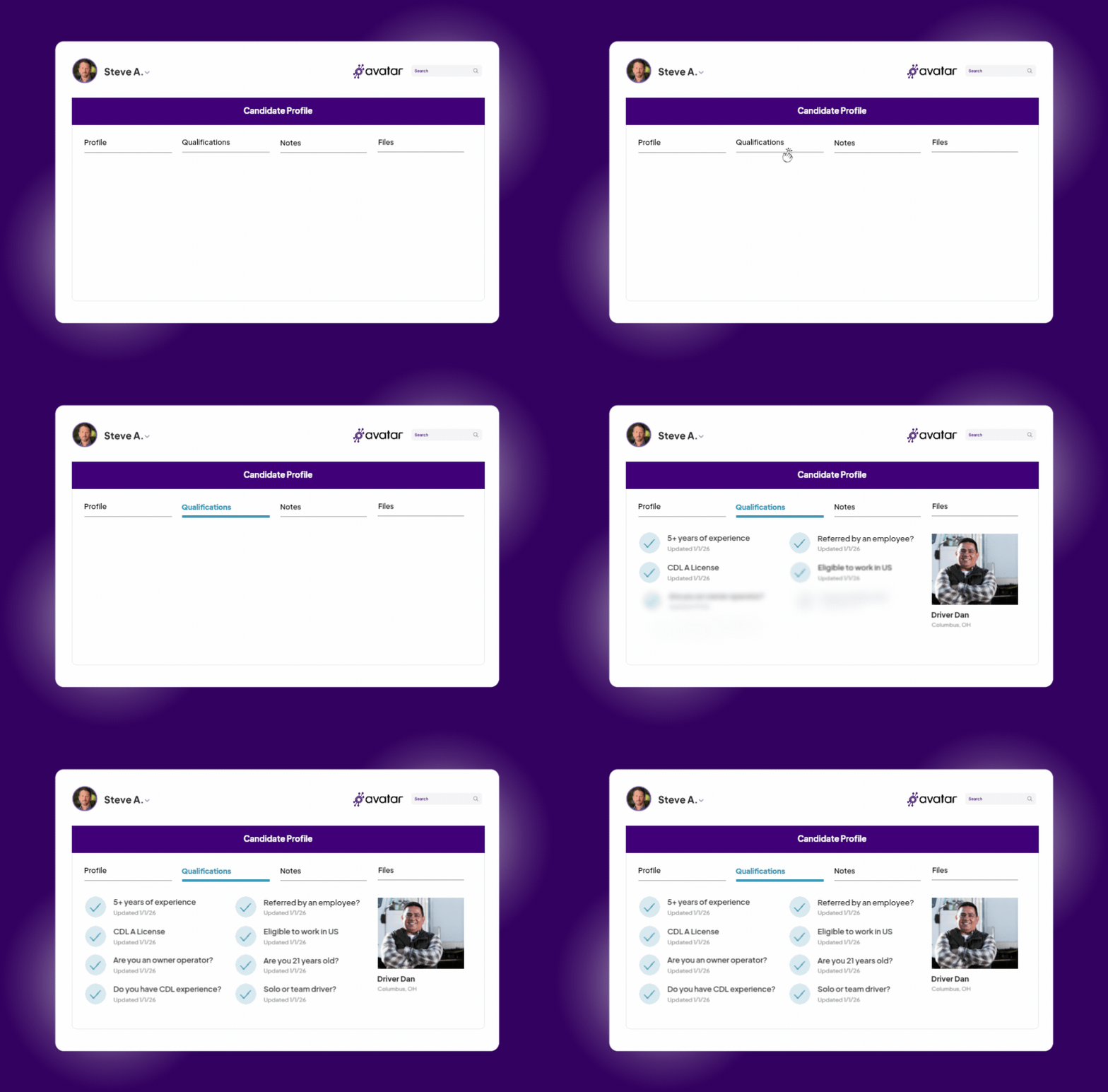
Qualifications Tab
- Every candidate's full question-and-answer record lives under the Qualifications tab on their profile
- Permanent and date-stamped — no digging through notes or scrolling through emails
- Answers stay on the profile even as the candidate moves through your pipeline

Build your question list
Navigate to Configuration → Jobs Board Landing Pages → Qualification Questions. Drag questions from the library into your active list and customize phrasing per your voice.

Assign questions by role
Your master list applies to all positions. For non-CDL roles like Mechanics or Dispatchers, toggle off CDL-specific questions in one click on that position's profile.

Driver applies on your landing page
When a driver submits an application, they answer your 3–5 qualification questions as part of the short-form flow. Their answers flow into DriverHub instantly with their candidate record.

Answers appear in the Candidate Browser
Add qualification answer columns to your browser view. See CDL class, experience, and violations across all applicants at once.

Filter and prioritize in seconds
Sort by any qualification column. Save the view. Your recruiter opens DriverHub and immediately sees who meets your minimum requirements.

Call only the candidates worth your time
Disqualifying answers were already surfaced. Your team spends their day on drivers who are already worth their attention.
Why Your Team Has Nothing to Lose
Qualification Questions are included with your DriverHub subscription and take under 10 minutes to configure.
Included at no extra cost
Qualification Questions are a core part of DriverHub — no add-on fee, no per-position charge, no extra setup cost.
Keeps application volume high
The 5-question cap recommendation keeps friction low. Drivers answer in under 90 seconds and your team gets everything they need to make a go/no-go call.

Configured in under 10 minutes
Drag questions into your active list, customize phrasing, and publish. No developer, no IT ticket, no waiting.
Works for every role, not just drivers
Configure different question sets for CDL drivers, mechanics, dispatchers, and any other position you're hiring for.
DriverHub Qualification Question Capabilities
| Capability |  |
Details |
| Pre-built CDL question library | ✅ Yes | Ready-made questions for CDL class, endorsements, years of experience, violations, and more |
| Drag-and-drop question builder | ✅ Yes | Drag questions into your active list in any order |
| Custom question wording | ✅ Yes | Reword any question in your company's voice without changing the data it collects |
| Role-specific question sets | ✅ Yes | Toggle off CDL questions for non-CDL roles in one click |
| Questions for non-driving roles | ✅ Yes | Set up different questions for mechanics, dispatchers, and any other position |
| Instant landing page updates | ✅ Yes | Question changes go live on your Candidate Landing Page right away |
| Answers as sortable columns | ✅ Yes | Add qualification answers as columns in the Candidate Browser and filter in seconds |
| Works with Saved Views | ✅ Yes | Save your qualification filters as a view and return to it any time |
| Date-stamped answer history | ✅ Yes | Every answer lives permanently under the Qualifications tab on the candidate's profile |
| Long application required | ❌ No | DriverHub recommends 5 questions or fewer, which drivers answer in under 90 seconds |
| Developer or IT needed | ❌ No | Most teams configure their questions in under 10 minutes |
| Extra cost | ❌ No | Included with DriverHub: no add-on fee, per-position charge, or setup cost |
Book a Personalized DriverHub Demo
Schedule your DriverHub demo to see how Avatar customers reached 100% compliance and cut cost per hire by more than 50%.
.webp?width=580&height=387&name=Avatar%20DriverHub%20Demo%20Driver%20Recruiting%20Software%20DOT%20Compliance%20Software%20Applicant%20Tracking%20System%20(1).webp)